Every message,
sent without you lifting a finger.
Automated appointment reminders, payment confirmations, thank-you messages, and review requests - sent by email, SMS, or WhatsApp, exactly when they should be. Set it up once; inkStar handles every customer touchpoint from booking to aftercare, for tattoo studios, PMU artists, barbers, and piercers.

Manually texting reminders is a losing game
Between clients, appointments, and everything else, reminders are the first thing to slip - and every missed one costs you a chair, a review, or a returning customer.
Friday
4:47 PM
You're typing the same reminder, every single day
Copy-pasting "don't forget tomorrow at 2pm!" between sessions is manageable until it's a busy Friday and three of them get forgotten entirely.Forgotten reminders turn straight into no-shows
No text, no memory jog, no client in the chair. The deposit might cover the loss, but the empty slot doesn't fill itself.Aftercare and thank-yous get skipped when you're slammed
Clients leave without a follow-up message, don't know how to care for a fresh piece properly, and never hear from you again after they've paid.Payment reminders over personal texts feel unprofessional
Chasing a deposit or remaining balance from your own phone number blurs the line between studio and personal, and it's easy to forget who still owes what.You never get around to asking for reviews
You do great work, but the ask - the single biggest driver of new bookings - falls through the cracks because there's no natural moment built into your process.
One missed reminder is an accident. A pattern of them is lost revenue.
Notifications built to run themselves
inkStar comes with a complete set of pre-built message templates mapped to every stage of the customer journey. Turn on the ones you want, adjust the channel and timing, and forget about it.
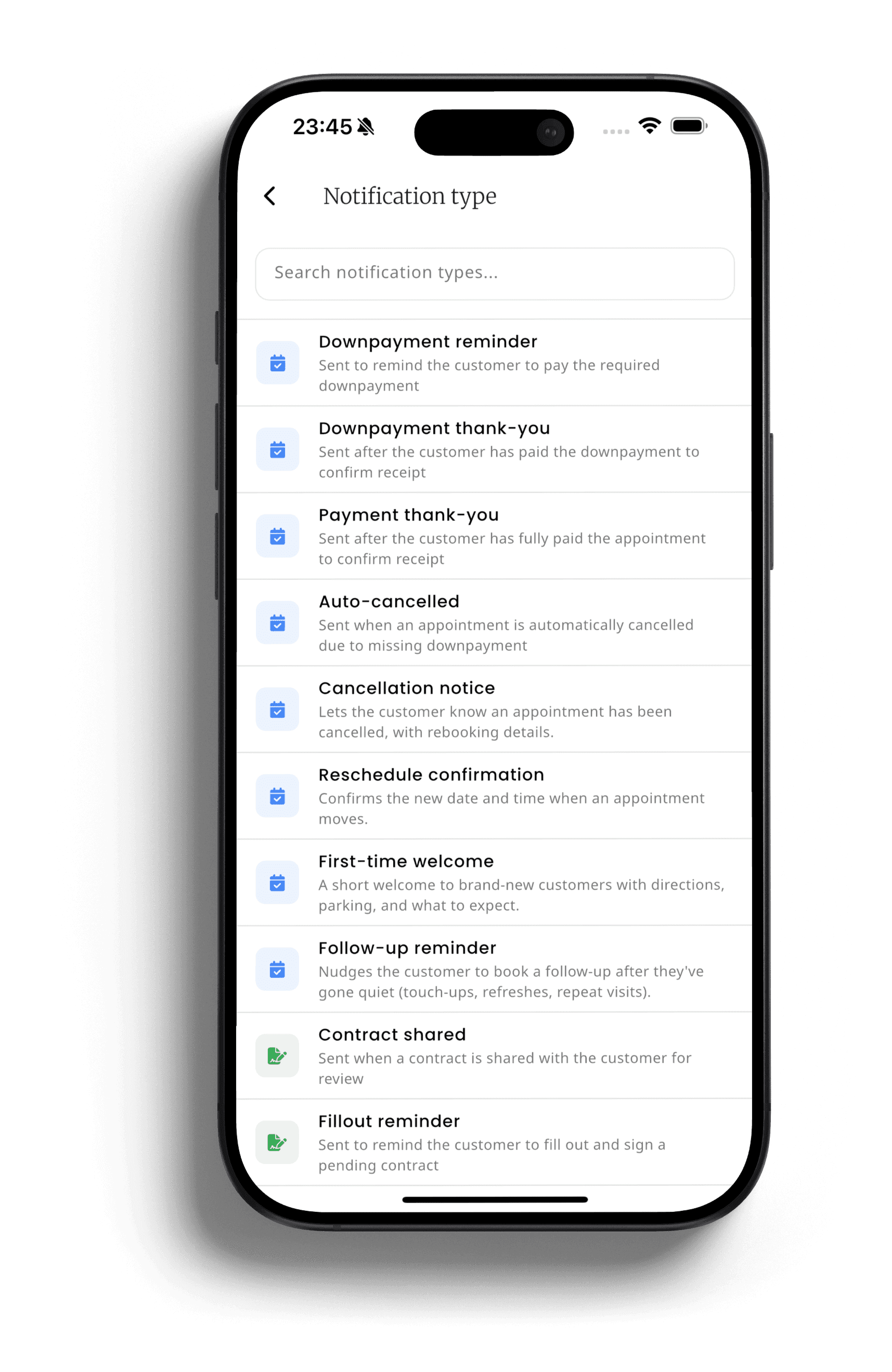
Browse your message library
Every message type your studio needs already exists - appointment reminders, deposit reminders, payment confirmations, cancellations, thank-yous, touch-up nudges, and contract reminders - ready to switch on.
Choose the channel and the moment
Turn each message on or off, pick email, SMS, or WhatsApp with automatic fallback if WhatsApp isn't available, edit the wording, and set exactly when it fires - 2 hours before an appointment, or 8 weeks after for a touch-up nudge.
It sends itself, forever
Once configured, inkStar sends every message automatically and on time. No more typing reminders between clients.
Every message, handled automatically
From perfectly timed reminders to one-tap review requests - here's how inkStar keeps every customer in the loop without you sending a single text.
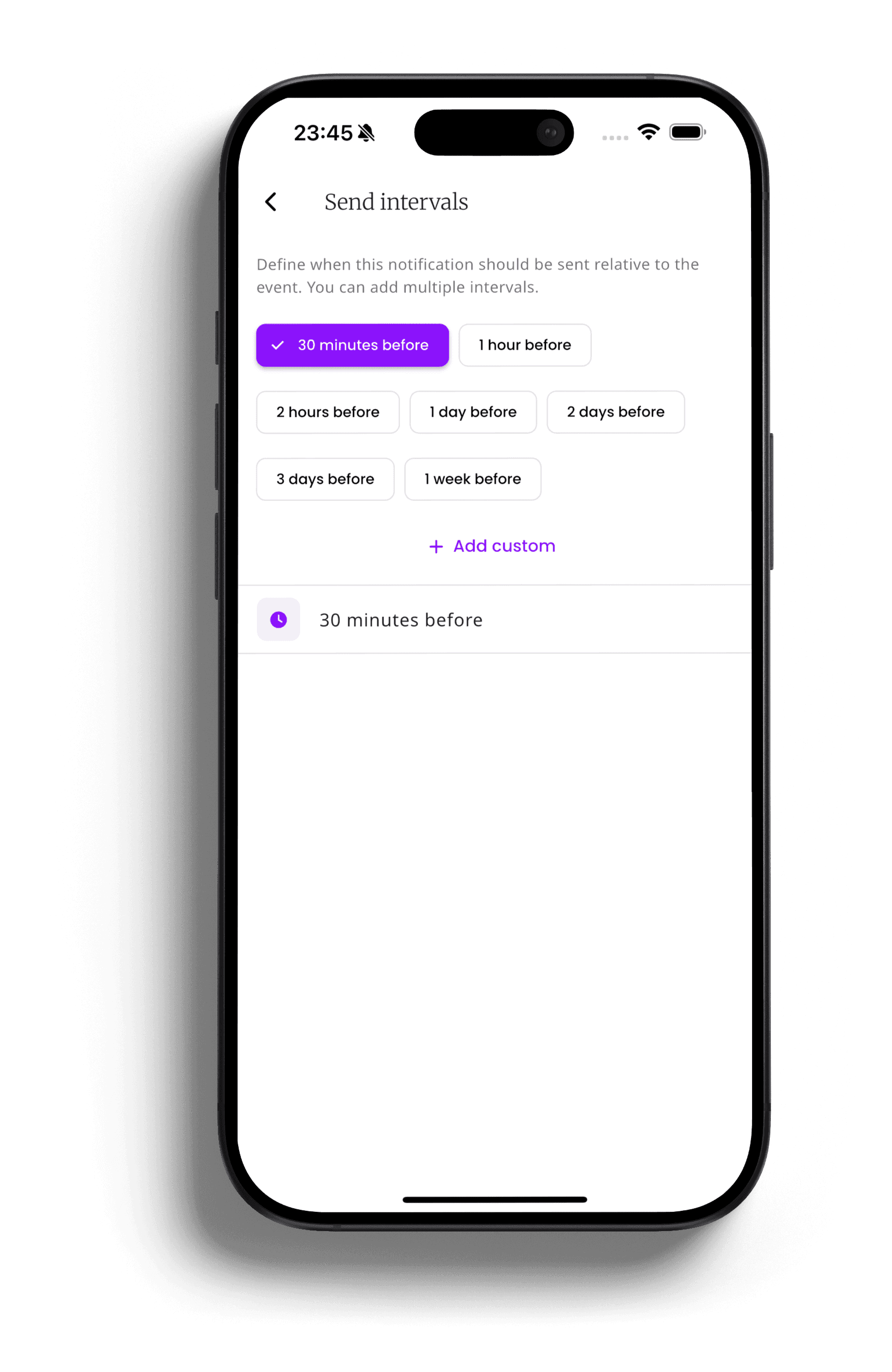
Appointment Reminders, On Autopilot
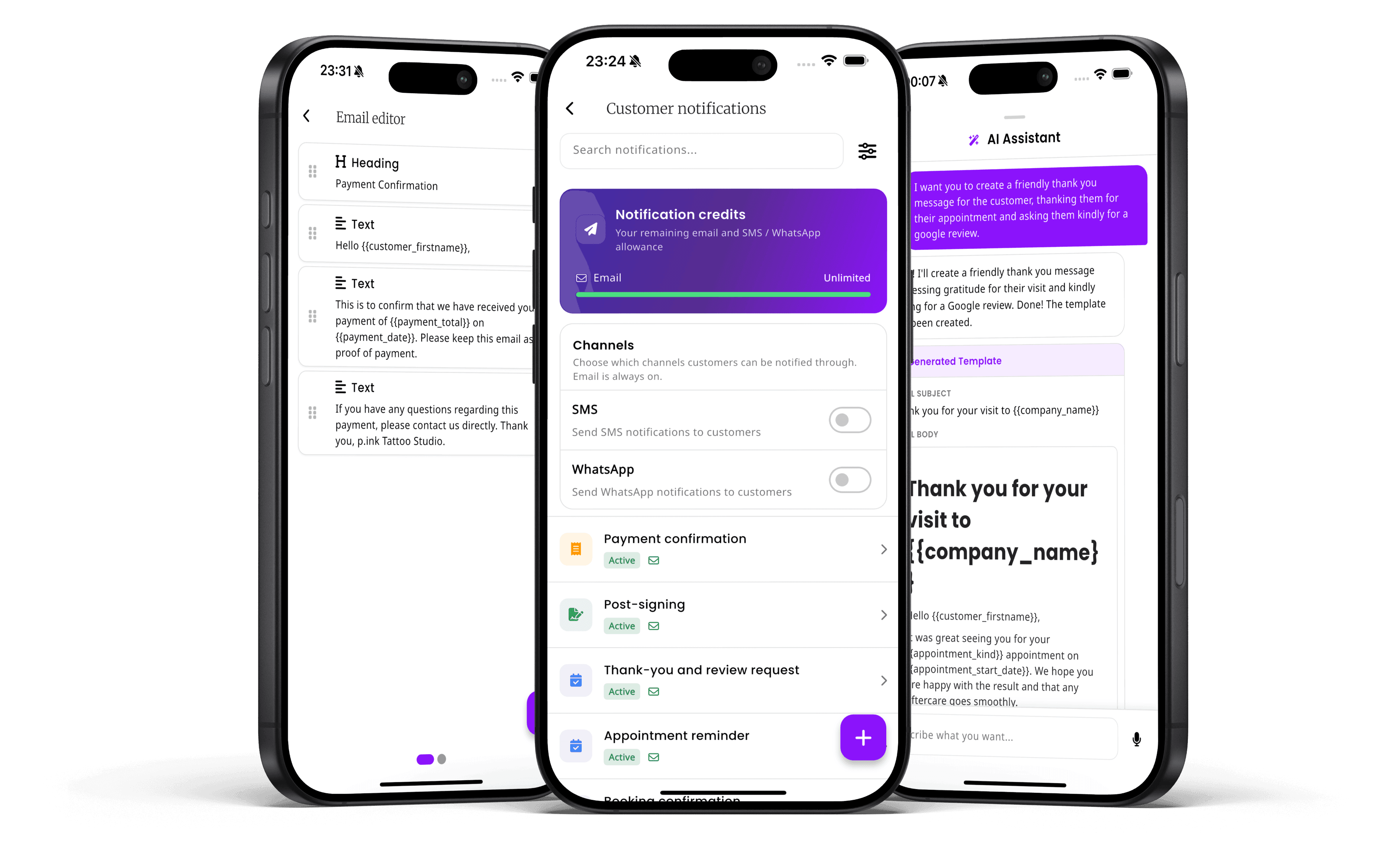
Appointment and deposit reminders go out automatically, each with its own configurable send interval - minutes, hours, days, or weeks before the appointment. Deposit reminders and full appointment reminders run on separate schedules, and anything cancelled is automatically skipped.
- Separate timing for deposit reminders vs. full appointment reminders
- Automatically skipped if the appointment is cancelled
- No manual sending, ever
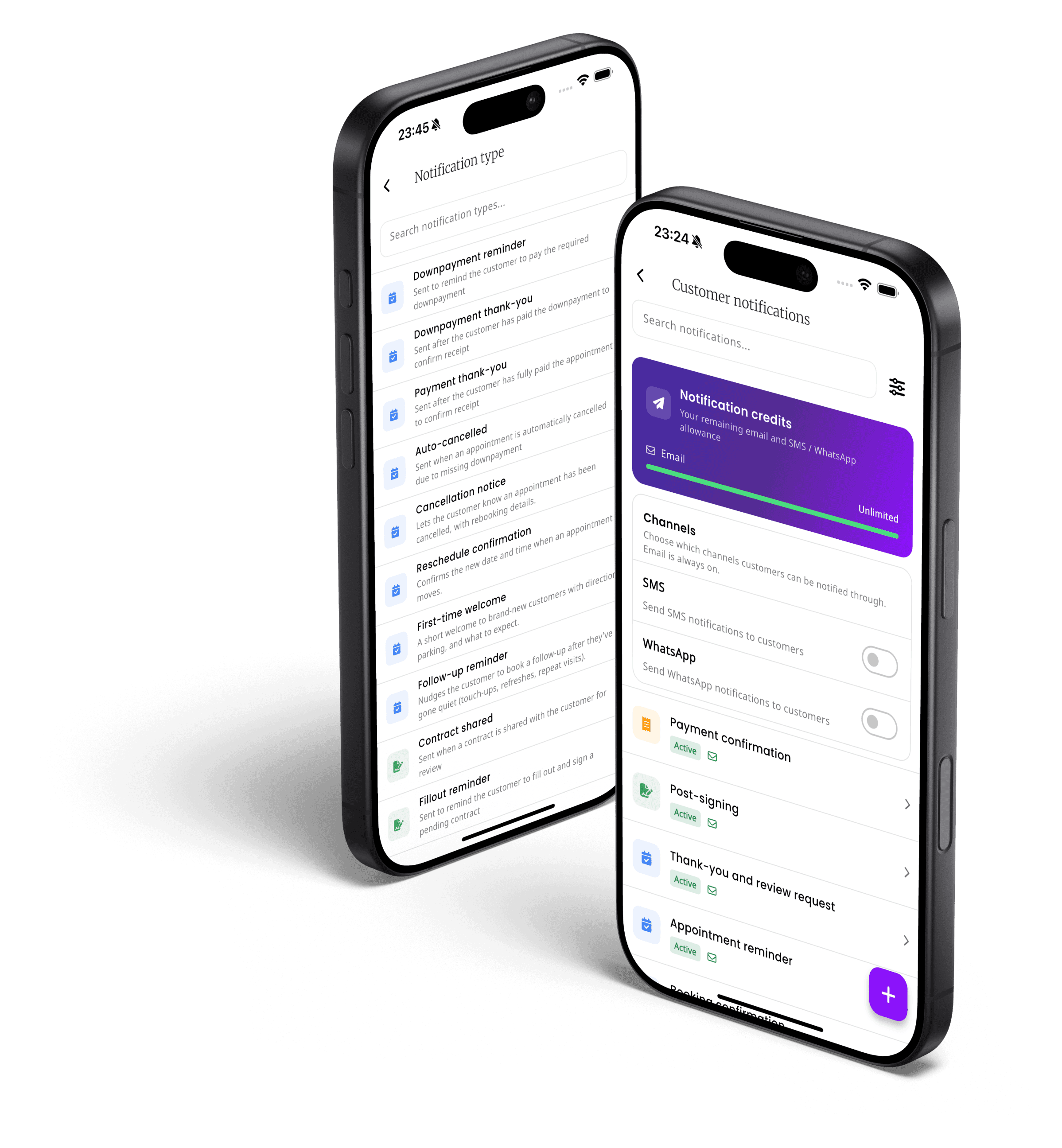
Every Channel, Automatically Right
Send by email, SMS, or WhatsApp - including WhatsApp Business - with a configurable fallback chain per template, so a message still reaches the customer even if WhatsApp delivery isn't possible.
- Pick the channel per message type
- Automatic fallback to SMS or email if WhatsApp isn't reachable
- A consistent, professional sender identity instead of a personal number
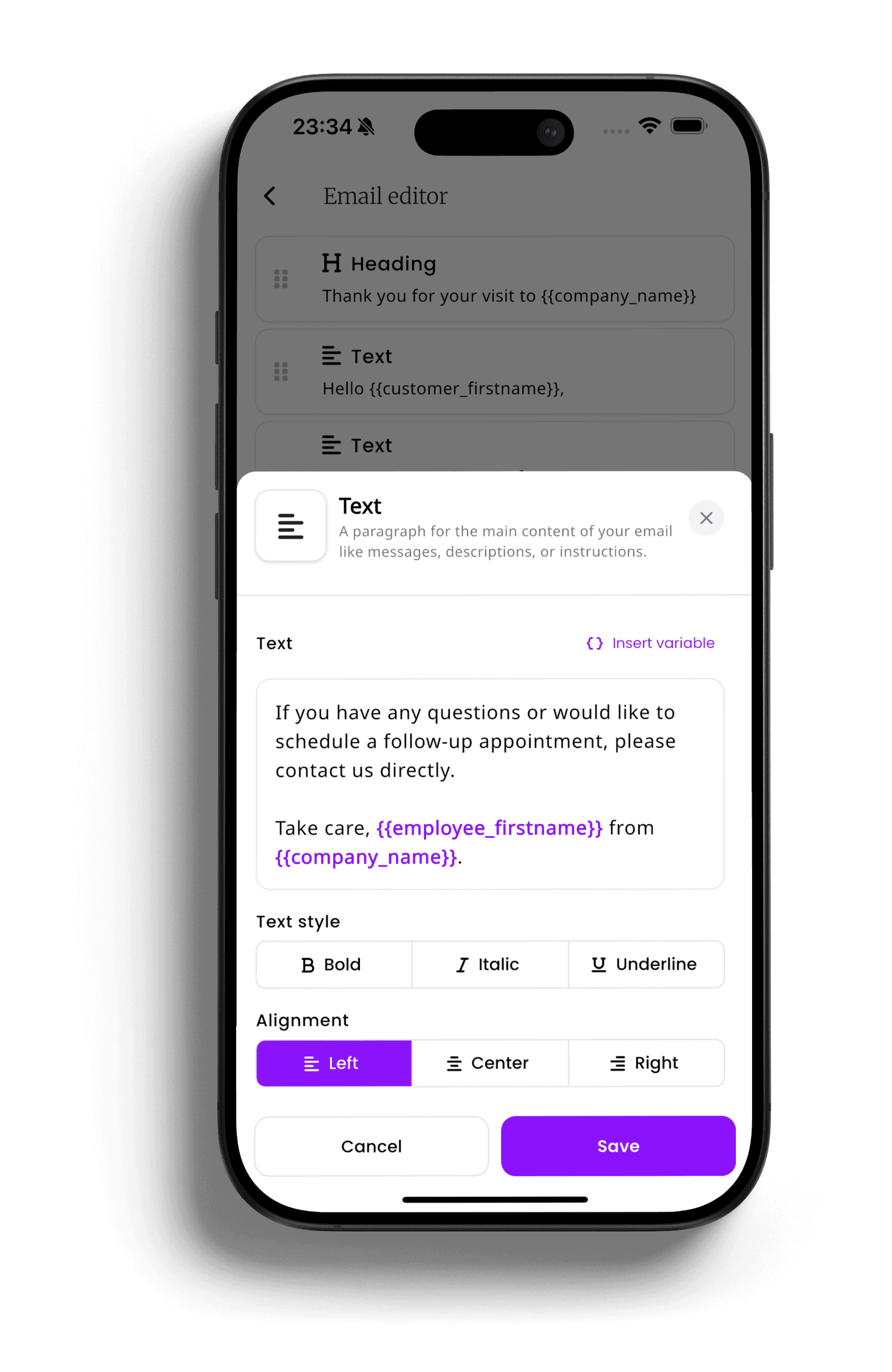
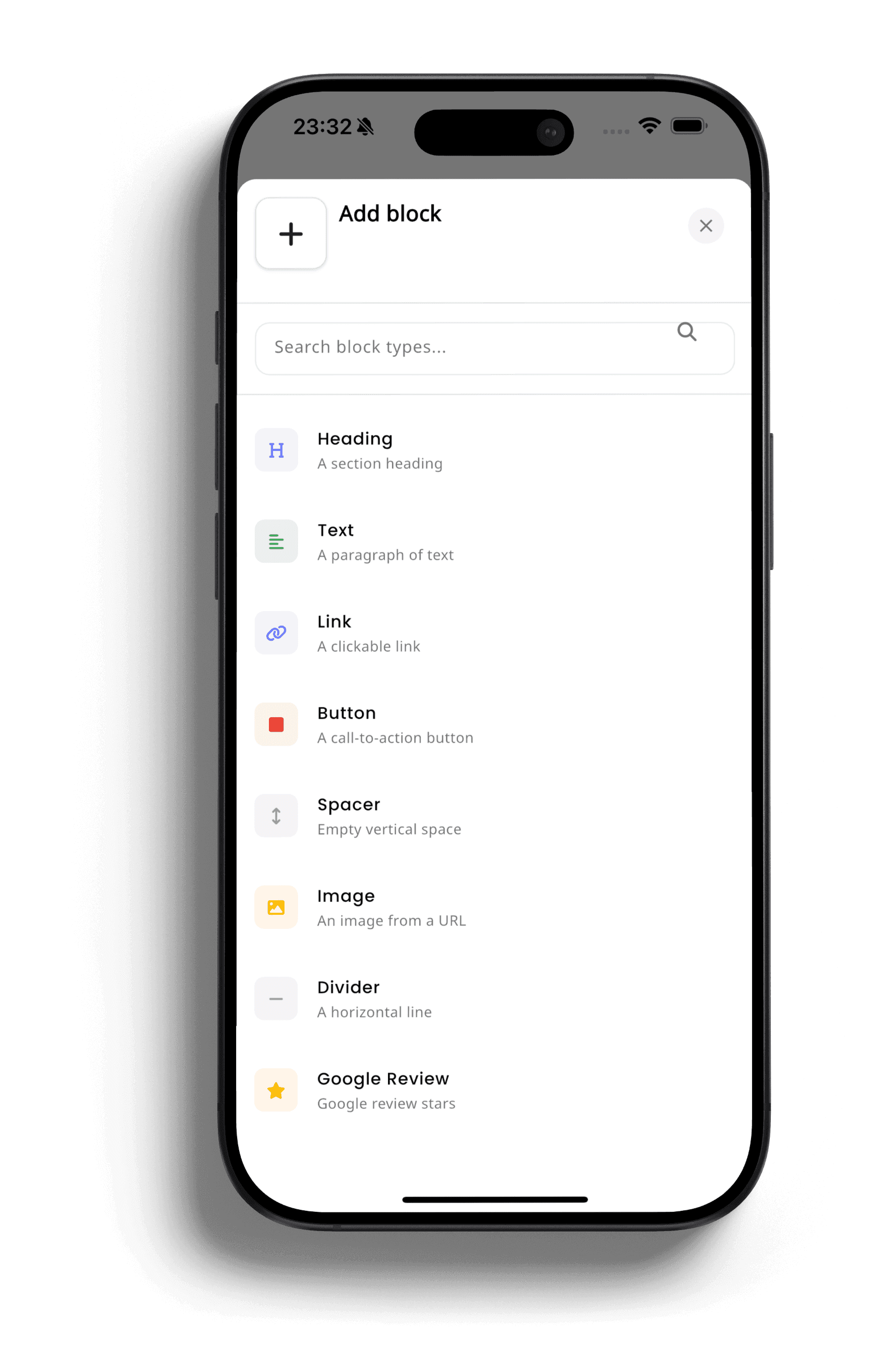
A Message Editor Built Like a Website Builder
The email block editor lets you build the layout with headings, text, links, buttons, images, and dividers, with live preview and dynamic variables like customer name and appointment time that auto-fill with real data.
- Drag-and-drop blocks, not a plain-text box
- Dynamic variables so every message feels personal without manual typing
- On-brand emails, not generic system notifications
Thank-Yous and Touch-Up Nudges That Bring Customers Back
Automatic post-visit thank-you messages, a distinct welcome message for first-time clients, and a smart re-engagement nudge sent automatically weeks after a visit - like an 8-week tattoo touch-up prompt.
- Automatic post-visit thank-you, no manual follow-up needed
- Timed re-engagement nudge for repeat business
- A distinct welcome message for first-time clients
One-Tap Google Review Requests
A dedicated Google Review block drops a direct review link straight into your thank-you emails, turning a routine post-visit message into a review request with a single click for the customer.
- Review link auto-inserted right when a happy customer says thanks
- No separate review-campaign tool required
- Turns satisfied customers into public proof automatically
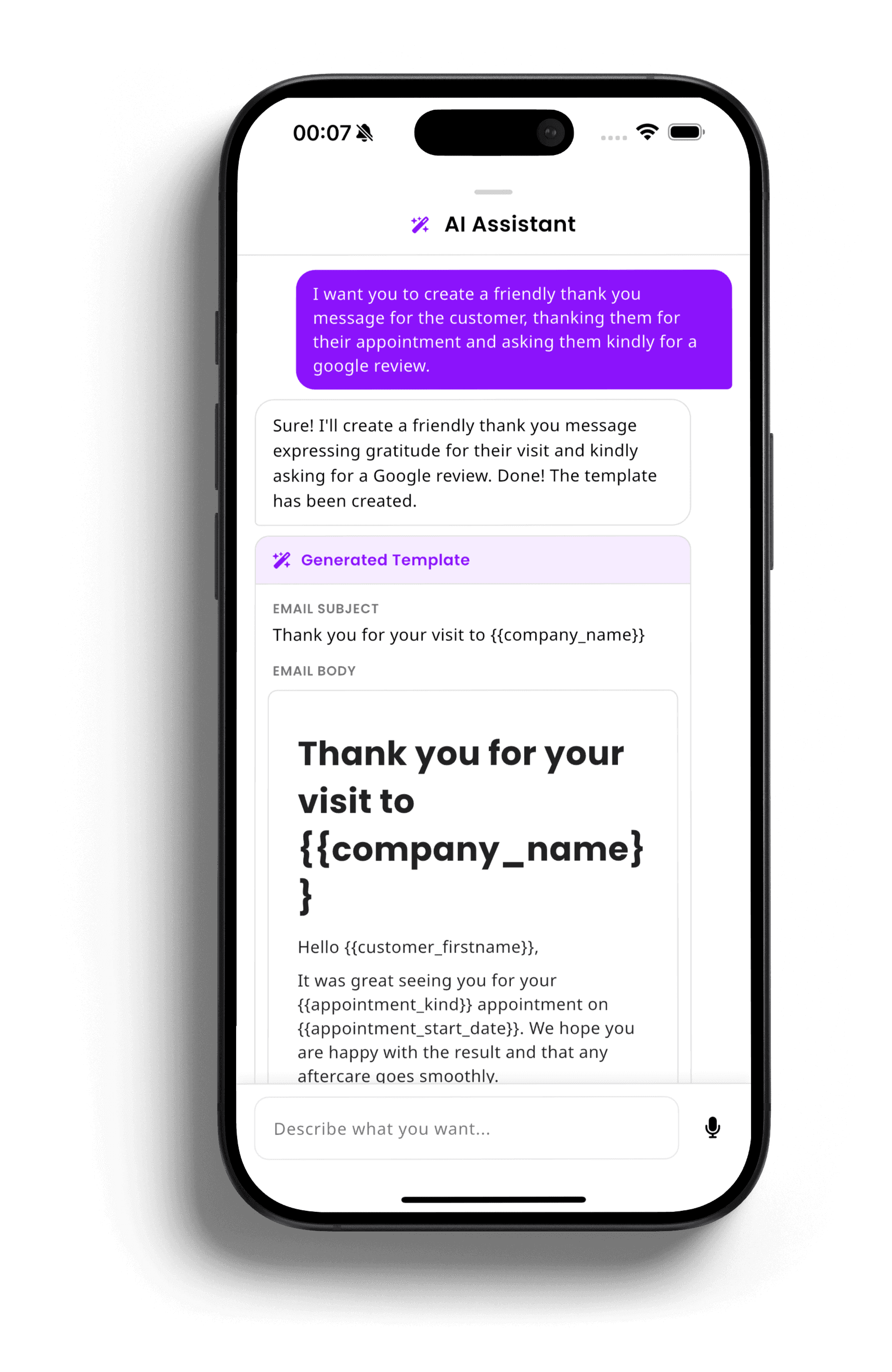
An AI Assistant That Writes Your Messages For You
Don't want to write a notification from scratch? Describe what you need in plain language - "a friendly thank-you that asks for a Google review" - and the built-in AI Assistant drafts a complete, on-brand subject line and email body for you, ready to review, tweak, and turn on in seconds.
- Describe the message you want in a normal sentence, no templates to learn
- Generates a complete draft with the right variables already filled in
- Review and edit before it goes live - you stay in control
See the difference for yourself
Texting reminders by hand doesn't scale, and generic bulk tools weren't built for appointments. See how inkStar stacks up.
Appointment Reminders
- Manual Texting
- Sent one by one, easy to forget
- Generic Bulk Tool
- Mass blast, not tied to appointment time
- inkStar
- Automatically timed per appointment
Multi-Channel Delivery
- Manual Texting
- Whatever app you happen to open
- Generic Bulk Tool
- Usually email or SMS only
- inkStar
- Email, SMS, and WhatsApp with fallback
Message Personalization
- Manual Texting
- Copy-paste and hope you didn't typo a name
- Generic Bulk Tool
- Basic merge fields
- inkStar
- Auto-filled customer and appointment details
Timing Control
- Manual Texting
- Whenever you remember
- Generic Bulk Tool
- Fixed schedule, not appointment-aware
- inkStar
- Configurable interval per message type
Thank-You & Aftercare Follow-Up
- Manual Texting
- Often skipped entirely
- Generic Bulk Tool
- No appointment context
- inkStar
- Sent automatically after every visit
Touch-Up & Re-Booking Nudges
- Manual Texting
- Rarely happens
- Generic Bulk Tool
- No appointment context
- inkStar
- Automatic nudge weeks after the visit
Google Review Requests
- Manual Texting
- Ask in person, if you remember
- Generic Bulk Tool
- Needs a separate review tool
- inkStar
- Built directly into thank-you emails
Setup & Ongoing Effort
- Manual Texting
- Constant manual work, every day
- Generic Bulk Tool
- Separate subscription and integration
- inkStar
- Configure once, runs forever
Studios that stopped chasing clients manually
See how real studio owners eliminated missed reminders and grew their reviews with inkStar's automated notifications.
I used to text reminders between clients and forget half the time. Now it just happens.
Reminders used to get squeezed in between sessions and regularly slipped through the cracks. Since turning on automated reminders with configurable timing, no-shows from forgotten messages have dropped noticeably, and I don't think about it anymore.
Our Google rating jumped because every thank-you message asks for a review automatically.
Asking for reviews was something I always meant to do but never got around to. Now the thank-you email includes a one-tap review link every single time, and reviews have grown steadily without me doing anything extra.
Clients get reminders on WhatsApp now instead of a text from my personal number - it feels like a real business.
We used to text clients from a personal phone number, which never felt quite right. Automated, branded messages across WhatsApp, SMS, and email with fallback changed the impression clients have of the studio completely.
Frequently asked questions
Everything you need to know about automated customer notifications, message channels, and timing with inkStar.
Appointment reminders and confirmations, deposit and payment reminders and confirmations, cancellations (manual and automatic), thank-you messages, first-time-client welcomes, touch-up and re-booking nudges, and contract-related reminders such as sharing, fillout reminders, and signed confirmations.
Message types are fixed by design to keep the system reliable and simple to manage, but every existing type is fully configurable - content, timing, channel, and on/off state - so you can tailor each one to your studio without needing to build a new automation from scratch.
All three. Email is included on every plan. SMS and WhatsApp (including WhatsApp Business) are available on paid plans, and each message template lets you choose which channel it goes out on.
Each template can be configured with a fallback - WhatsApp to SMS, or WhatsApp to email - so the message still reaches the customer if WhatsApp delivery isn't possible.
Yes. Every message type has its own configurable send interval - minutes, hours, days, or weeks before or after the triggering event - such as a reminder 2 hours before an appointment or a touch-up nudge 8 weeks after.
Yes. Email messages use a block editor with headings, text, links, buttons, images, dividers, and a Google review block, with live preview and auto-filled variables like customer name and appointment time. SMS and WhatsApp messages are concise text using the same variables.
SMS and WhatsApp are available on paid plans. Free and Starter plans are limited to email notifications, and upgrading unlocks the additional channels.
These are transactional messages tied directly to a booking or payment, not marketing blasts, but you're always in control of what's active. Before switching any template live, use "Send Test Notification" to preview exactly what the customer will receive, with real data filled in.
Still have questions? Chat with our team